Showing posts with label google labs. Show all posts

Thursday, July 16, 2009

Google Calender Labs


Moving the innovation from the main product to a gallery of experimental features was a great idea for Gmail. The number of features increased rapidly without cluttering the product because you could select only the features that are useful to you. The downside was that most of the Gmail Labs were in an early phase, some were buggy and had to be temporarily disabled, while others were simply removed.

The first feature that graduated from Gmail Labs and became a standard feature is Google Tasks: you'll find it below the contacts link and this time there's no option to remove it. "The idea was always that the most popular and viable Labs features would graduate and be made more readily available to all users... and that some of the less used, less viable ones would disappear forever," explains Google.

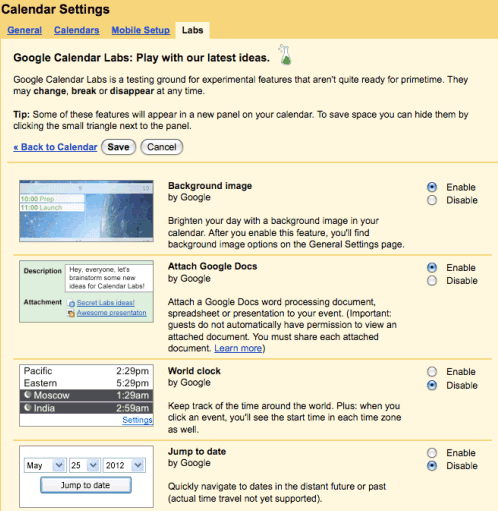
Since Gmail Labs was a success, Google decided to create a similar gallery of experimental features for Google Calendar. "We've been looking for a way to release early features to users in a quick and experimental fashion, but in a way that would let developers and customers outside of Google extend Calendar too. We've seen how successful Gmail Labs has been and decided Calendar deserved Labs too," notes the Google Apps blog.

Google Calendar Labs has only 6 experiments: an option to customize the application using a background image, a clock that shows the current time in multiple time zones, an option that lets you jump to a certain date, a countdown to the next event, schedules for shared calendars and an option to attach Google Docs documents.
http://googlesystem.blogspot.com/2009/07/google-calendar-labs.html

Sunday, May 31, 2009

Google wave is a killer application watch out


A new service which–well, it’s one of the most ambitious services that Google or anyone else has cooked up? How ambitious? Project leader Lars Rasmussen says that it began with the question “What might e-mail look like if it were invented today?” ... It:
Is a service that looks like a rich piece of client software;
Behaves like sophisticated threaded e-mail;
Acts like IM when multiple collaborators are online at once.
Is one of the most real-time collaborative tools I’ve ever seen.
Has revision marking and versioning for workgroup editing.
Has instant photo sharing.
Allows its functionality to be embedded into blogs and social networks;
Can serve as a container for OpenSocial applications;
Has what Google says is a revolutionary spell checker;
Comes in mobile flavors for Android and iPhone;
Is an open-source project that lets developers write both Wave extensions ... and their own servers.

Wednesday, May 20, 2009

New in Labs: Automatic message translation


Back in the early days of human existence, before language had fully developed, our caveman ancestors probably did a lot of grunting. Language, and thus life, were pretty simple: watch out for that saber-toothed tiger ("Blorg! AIYA!!!"); stop riding the wooly mammoth and help me pick some berries ("Argh. Zagle zorg!"); man, it's cold in this Ice Age ("Brrrr.").

Somewhere along the line, all those grunts diverged into thousands of distinct languages, and life became both richer and more complicated. And for the last few eons or so, we've struggled to communicate in a multilingual world. Which brings us to today. Since the heart and soul of Gmail is about helping people communicate, I'm proud to announce the integration of Google's automatic translation technology directly into Gmail.
Simply enable "Message Translation" from the Labs tab under Settings, and when you receive an email in a language other than your own, Gmail will help you translate it into a language you can understand. In one click.
If all parties are using Gmail, you can have entire conversations in multiple languages with each participant reading the messages in whatever language is most comfortable for them. It's not quite the universal translators we're so fond of from science fiction, but thanks to Google Translate, it's an exciting step in the right direction. I use this feature everyday to help me work with teammates around the globe (they think my Japanese is much better than it really is...shhhh!).

Whether you're reading a family update from inlaws on the other side of the world, working with a multinational team, or just trying to bring about world peace, don't worry, Gmail's got your back.

Friday, April 24, 2009

Power point and TIF in Gmail


A few months ago, we added fast online viewing of PDFs in your browser. As of today, that same viewer now supports TIFF and Microsoft PowerPoint document formats too: you can now view TIFF and PPT files online, directly in your browser, without having to save the files to your computer and without needing to buy, install, or wait for any special software to start up.

We've had a "View as slideshow" option for PowerPoint files for a while; now we've integrated this conversion technology into the same viewer that we use for PDFs and TIFFs.

his viewer provides a richer set of features than the old "View as slideshow" version: you can zoom in and out, select text to copy and paste, and "print" the presentation to a PDF document. And, unlike the old version, we no longer require you to have a Flash plugin installed on your browser.

Courtesy:


Sunday, April 12, 2009

Google Lab Applications now available

Organizations using Google Apps can now start using Google Labs applications. The first three new apps are:

Google Moderator – Manage Q&A sessions from the smallest video conference to the largest all-hands company meeting.

Google Code Reviews – Collaborate with others to catch bugs in software you're developing.

Google Short Links – Create easy-to-remember links for both your internal and external web pages.

Stay tuned for more Google Labs applications from Google and other software developers.

Editions impacted:
Standard, Premier, Education and Partner Editions

Languages impacted:
US English

How to access what's new:
Visit the Solutions Marketplace (see link below) to learn more about Google Labs and select the new applications you want to use in your organization.

For more information:

Friday, April 10, 2009

New in google Labs Gmail Features

Inserting images in Gmail:

Well, it's about time. You no longer have to use workarounds to put images into your messages or attach images when you really want to inline them. Just turn on "Inserting images" from the Labs tab under Settings, and you'll see a new toolbar icon like this:Make sure you're in rich formatting mode, or it won't show up. Click the little image icon, and you can insert images in two ways: by uploading image files from your computer or providing image URLs.

Source courtesy
http://gmailblog.blogspot.com/2009/04/new-in-labs-inserting-images.html

Thursday, April 9, 2009

Google India labs Google Notice board

Google India has launched a new application called “Google Noticeboard” helping people to share and easily access information over the Internet. Google Noticeboard is a Firefox extension that is installed and configured on shared computers by an operator. After the initial configuration, the Noticeboard application enables community members to exchange information over the Internet without an intermediary. As a part of the configuration, each community Noticeboard is associated with an email address and a list of contacts.

For more details follow google labs link

http://labs.google.co.in/noticeboard/